
Automating Interac e-Transfer Reconciliation Without a Payment Processor
Interac has no API. No webhooks. No developer portal. For Familogue — a small local NGO I built software for — every incoming e-Transfer meant someone had to log into online banking, manually verify the deposit, and update the order record by hand. At low volume that’s tedious. At higher volume it becomes a bottleneck that delays fulfilment and wastes staff time on accounting that should be automatic.
I built a pipeline that handles the full cycle: Gmail ingestion via Google Apps Script, standardized email parsing, DB reconciliation, and order confirmation — with zero transaction fees and no third-party payment processor in the loop.
Why Interac and not Stripe
Stripe costs 2.9% + $0.30 per transaction in Canada. For a non-profit processing donations and product orders where customers already pay by e-Transfer by habit, that fee is real money leaving the organization on every transaction. The NGO’s members weren’t going to switch payment habits because the software changed.
The tradeoff: Interac gives you no programmatic interface. Stripe gives you instant webhooks, hosted checkout, and automated receipts. If you can absorb the fees and your customers aren’t already on e-Transfer, use Stripe. If your customers expect e-Transfer and every dollar matters, own the pipeline yourself.
The ingestion layer
The only reliable ingestion point for e-Transfer notifications is the recipient’s email inbox. Every Canadian bank sends a notification from notify@payments.interac.ca when a deposit lands — the format is standardized across institutions.
I wrote a Google Apps Script that polls the Gmail inbox on a time-based trigger, filters for messages with "Interac e-Transfer:" in the subject, and POSTs the full email payload to a secured webhook endpoint. No IFTTT, no Zapier, no third-party dependency — just Apps Script running inside the same Google Workspace account the NGO already uses.
function forwardEtransferEmails() {
  const labelName = "forwarded";
  const webhookUrl = PropertiesService.getScriptProperties().getProperty(
    "WEBHOOK_URL",
  );
  const apiKey = PropertiesService.getScriptProperties().getProperty(
    "WEBHOOK_API_KEY",
  );

  if (!webhookUrl || !apiKey) {
    Logger.log("Missing WEBHOOK_URL or WEBHOOK_API_KEY in Script Properties.");
    return;
  }

  const label = GmailApp.getUserLabelByName(labelName) ||
    GmailApp.createLabel(labelName);

  const threads = GmailApp.getInboxThreads();

  for (const thread of threads) {
    const messages = thread.getMessages();

    for (const message of messages) {
      if (!message.getSubject().includes("Interac e-Transfer:")) continue;

      const payload = {
        id: message.getId(),
        subject: message.getSubject(),
        sender: message.getFrom(),
        recipient: message.getTo(),
        reply_to: message.getReplyTo(),
        date: message.getDate(),
        body: message.getPlainBody(),
        html: message.getBody()
      };

      try {
        const response = UrlFetchApp.fetch(webhookUrl, {
          method: "post",
          contentType: "application/json",
          headers: {
            "Authorization": "Bearer " + apiKey,
          },
          payload: JSON.stringify(payload),
          muteHttpExceptions: true,
        });

        if (
          response.getResponseCode() >= 200 && response.getResponseCode() < 300
        ) {
          message.getThread().addLabel(label);
          message.getThread().moveToArchive();
        } else {
          Logger.log(
            `Webhook failed: ${response.getResponseCode()} - ${response.getContentText()}`,
          );
        }
      } catch (e) {
        Logger.log("Webhook error: " + e.toString());
      }
    }
  }
}
Auth is a Bearer token stored in Script Properties — not hardcoded. On a successful webhook delivery (2xx), the script labels the thread "forwarded" and archives it, so the inbox stays clean and processed messages are distinguishable from new ones.
Parsing the notification email
Because all Canadian banks route through Interac’s network, the notification emails are standardized. The sender is always notify@payments.interac.ca, and the plain-text body contains two fields that matter: Amount and Message.
The Message field is what the sender enters as a payment reference when they initiate the transfer — for Familogue, customers are instructed to enter their order number (e.g. FS1234). Extracting both fields is a regex pass against the plain-text body. No multi-bank format variations to handle.
This is the critical design decision that makes the whole pipeline viable: because Interac’s email format is consistent, parsing is reliable. If you were scraping bank-formatted HTML the problem would be much harder.
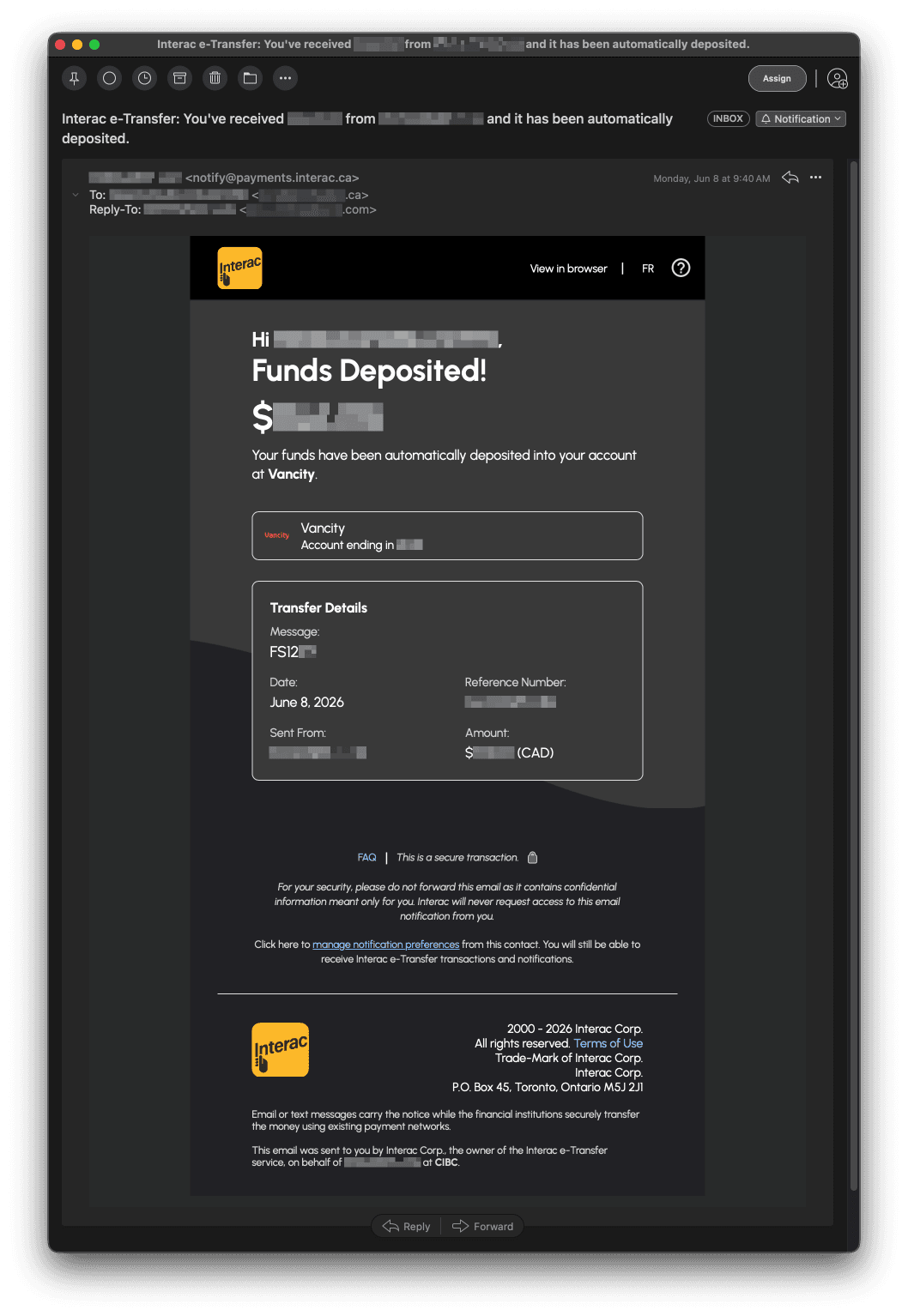
A standard Interac e-Transfer notification email from notify@payments.interac.ca — the Message field carries the order reference used for automated reconciliation.
DB reconciliation and order confirmation
The webhook handler receives the parsed payload and attempts to match it against pending orders. The matching logic is: reference number in Message field equals the order’s reference number AND the deposit Amount matches the order total. Both must match before the order transitions from pending to confirmed.
Idempotency is handled by checking order status before any transition — if the order is already confirmed, subsequent webhook deliveries for the same email ID are ignored. The Gmail message ID is stored alongside the order record, so duplicate deliveries (e.g. if the Apps Script trigger fires before a previous run completes) are safe to receive.
Once confirmed, the standard order fulfilment flow triggers: confirmation email to the customer, internal notification, inventory update. The NGO staff see a confirmation in the admin panel without ever touching a bank login.
Analytics
The admin dashboard exposes a payment activity log: deposit received timestamp, matched order reference, amount, and whether confirmation succeeded. Weekly and monthly volume breakdowns give the NGO operational visibility into payment patterns — useful for cash flow forecasting and identifying any deposits that couldn’t be matched automatically (wrong reference number entered by the sender).
This isn’t deep BI — it’s the minimum reporting an organization needs to trust that the automation is working and to handle exceptions manually when they occur.
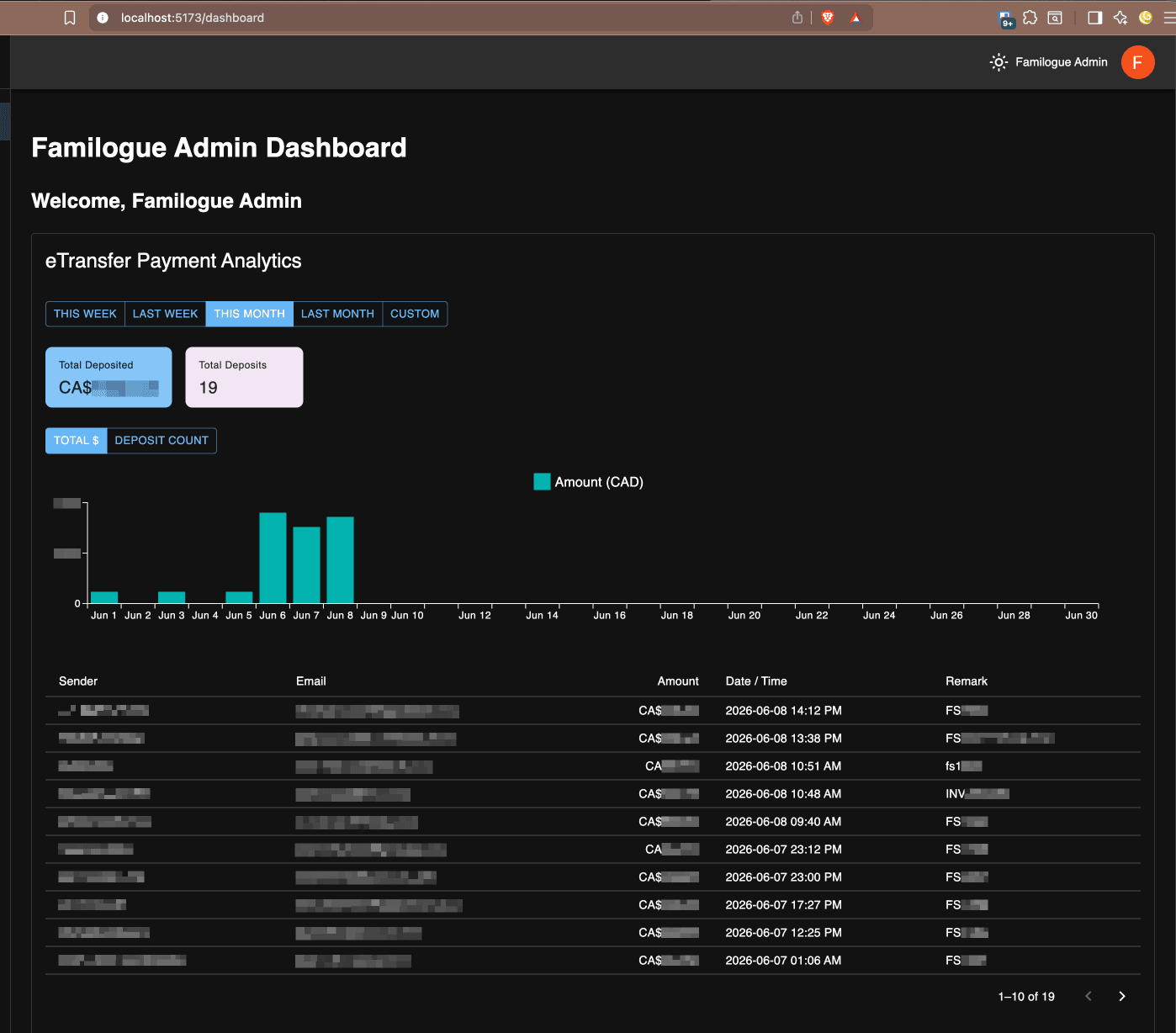
The Familogue admin dashboard’s eTransfer analytics view: deposit volume chart, summary totals, and a full transaction log.
Takeaway
The pipeline works because Interac’s notification emails are standardized and reliable, and Google Apps Script gives you a zero-infrastructure way to act on inbox events without OAuth complexity or third-party services. For Canadian SMBs and NGOs where customers already pay by e-Transfer, this approach eliminates manual reconciliation entirely — zero transaction fees, no payment processor dependency, full control over the confirmation flow. The constraint that Interac has no API turns out not to matter when the email itself is the event source.